Your family's whole day, on one screen.
Soccer practice is in one app, the chore chart is on the fridge, and the grocery list is on a scrap of paper. Lifeboard puts it all on an iPad on your kitchen counter, where everyone can see it.







Calendars, chores, groceries, photos…
…finally in one place.
No subscription.
No new device to buy.
No new app for everyone to learn.
Everything the family needs, a tap away.
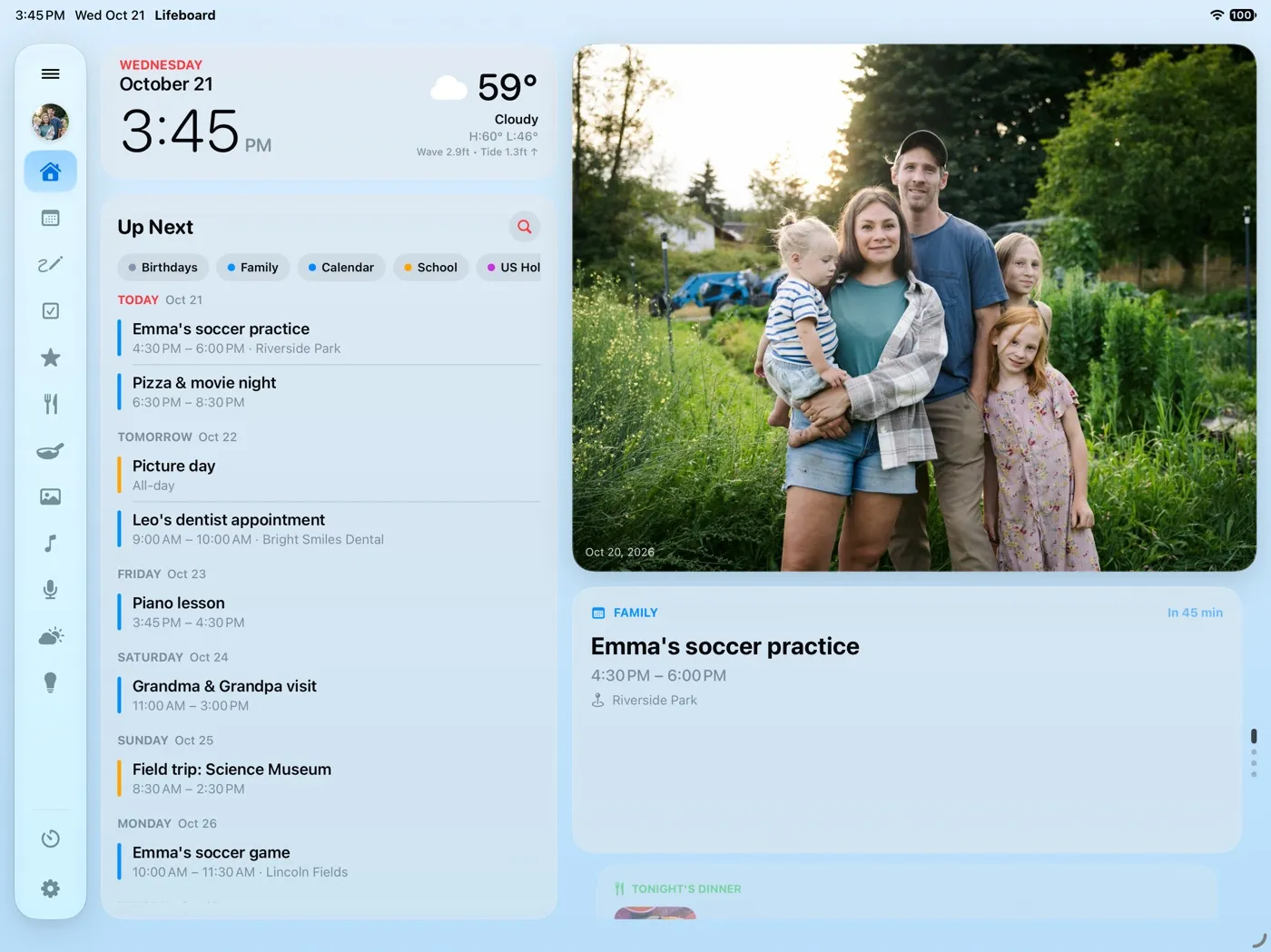
Home puts the clock and weather, what's next on everyone's calendars, tonight's dinner, who's earned what and countdowns to the big days on one screen you can read from across the kitchen. These are real screenshots, filled in for a sample family, the Parkers.
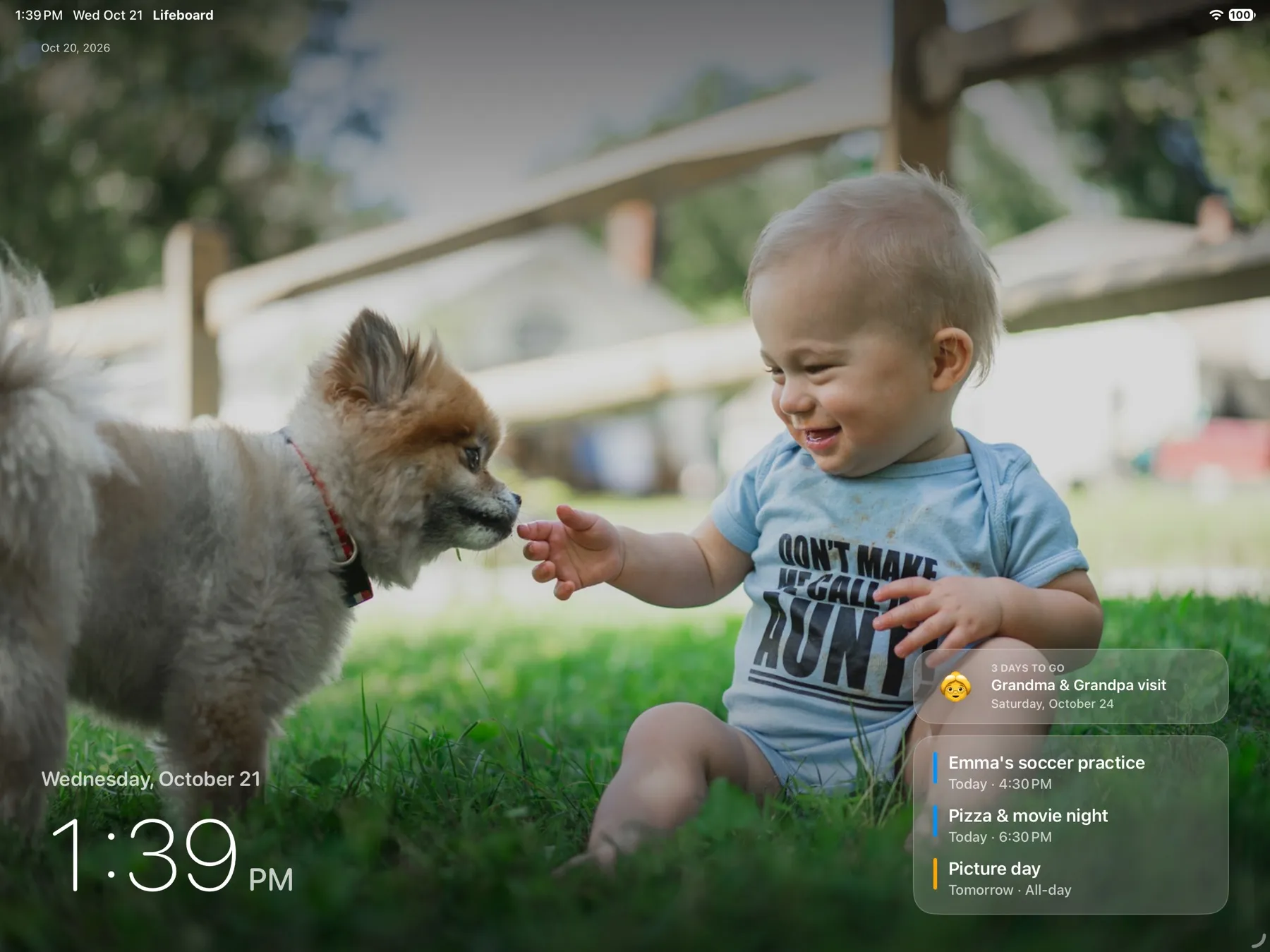
The best photo frame in your house is already on the counter.
When no one's using it, Lifeboard becomes a full-screen frame for your family's photos, with the time, today's plans and countdowns to the big days. Your photos stay in iCloud Photos, so there's nothing to upload.
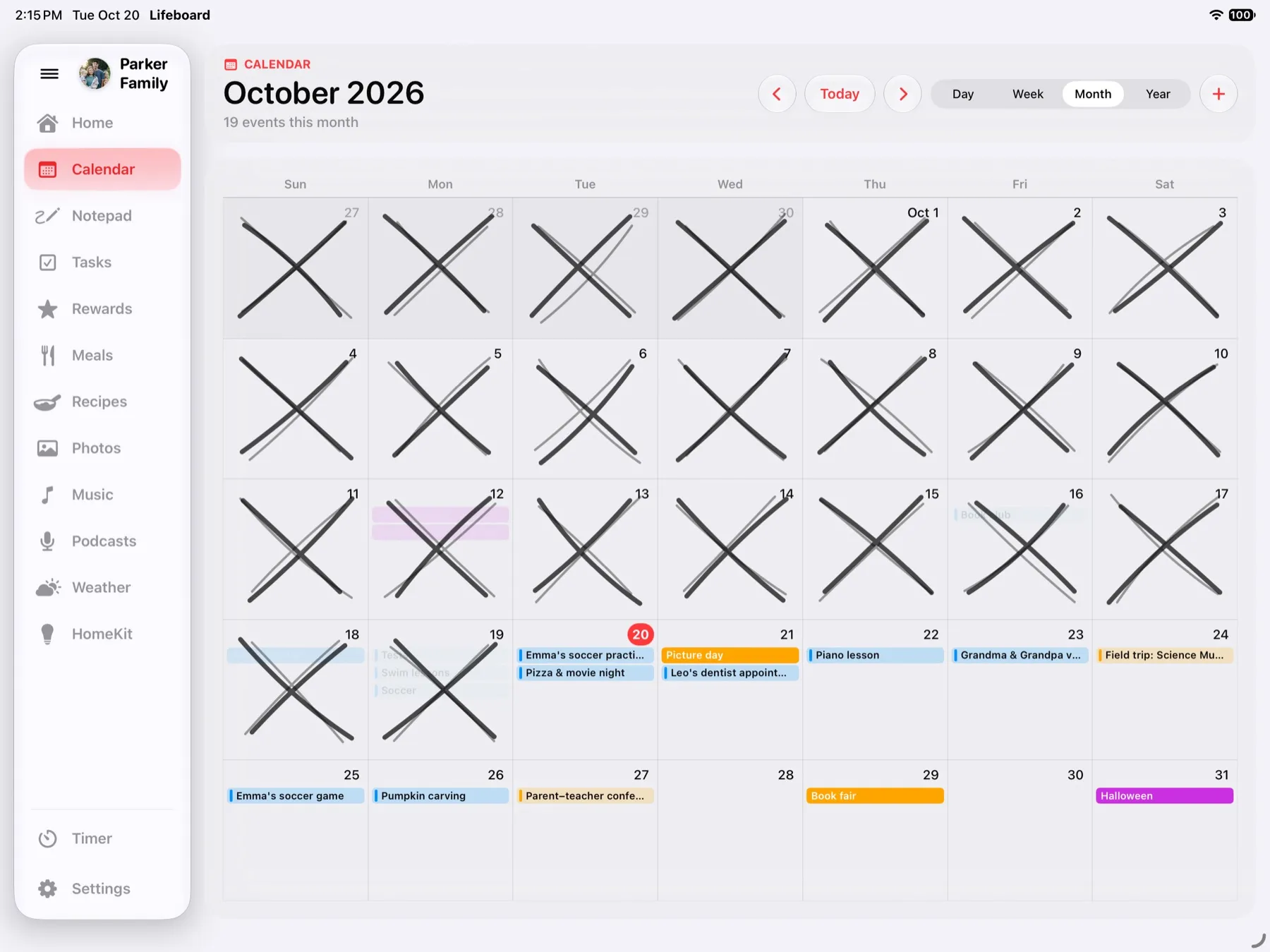
Everyone's plans, color-coded.
Every iCloud, Google and work calendar on the iPad, each person in their own color. Add an event on your iPhone and it's on the counter a moment later.
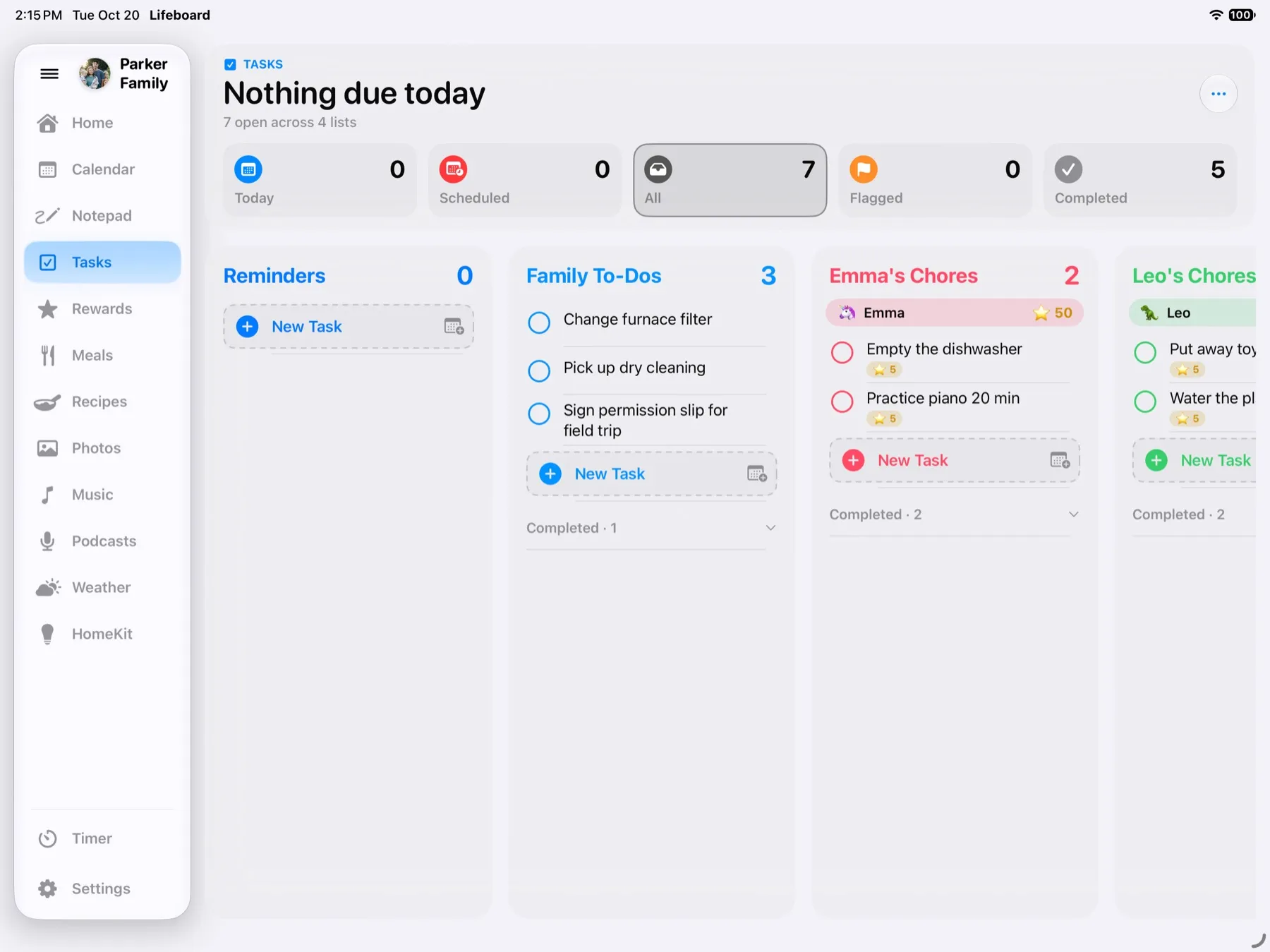
Chores they'll race to finish.
Each kid gets their own chore list and emoji. Chores live in Reminders, so you can add one from your iPhone and it's on the counter in seconds.
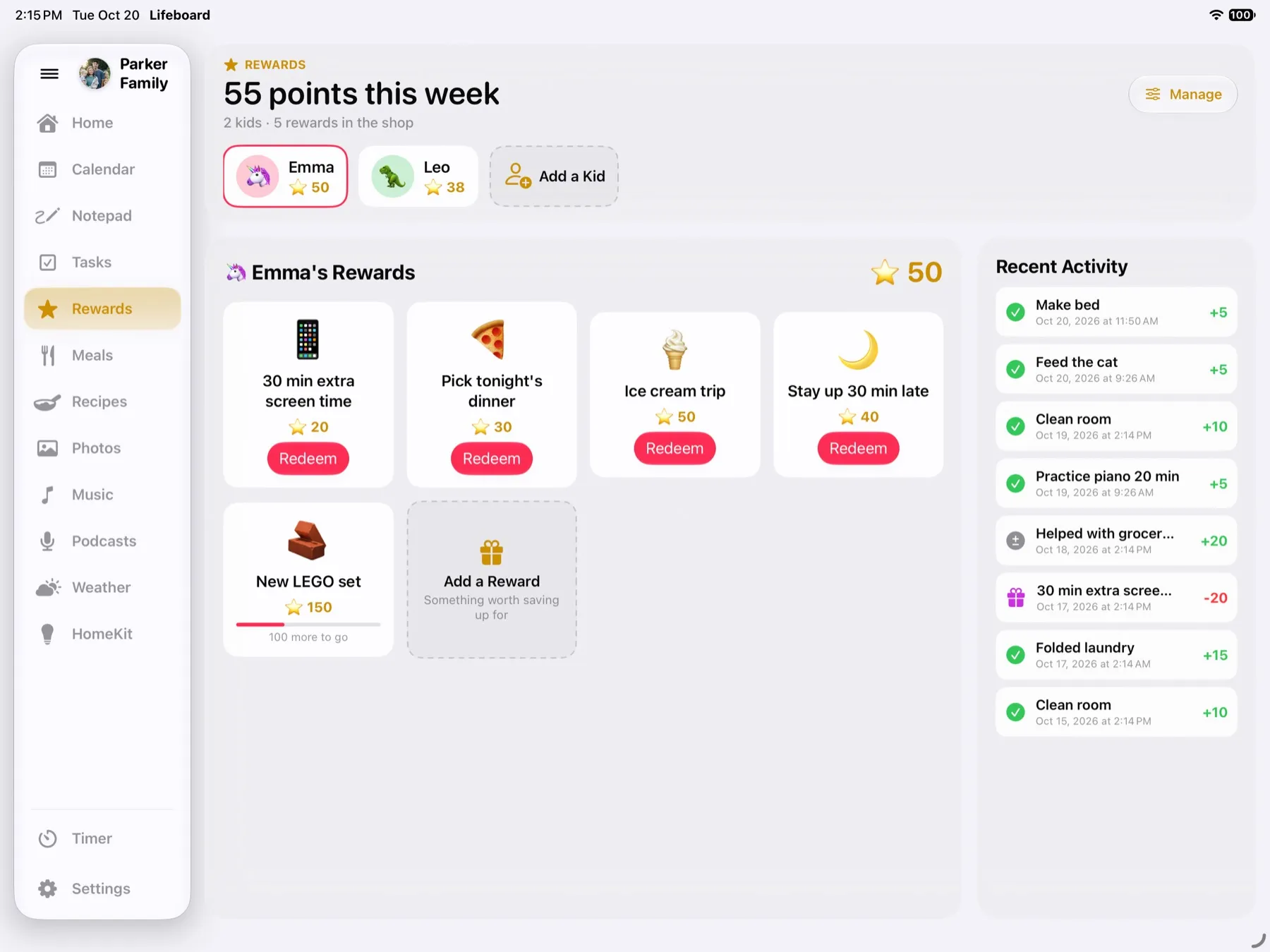
Points they can't wait to spend.
Every chore earns points toward a reward you choose, like picking tonight's dinner or an ice cream trip. Hand out a bonus for a good deed, and watch the celebration when they cash one in. No sticker chart required.
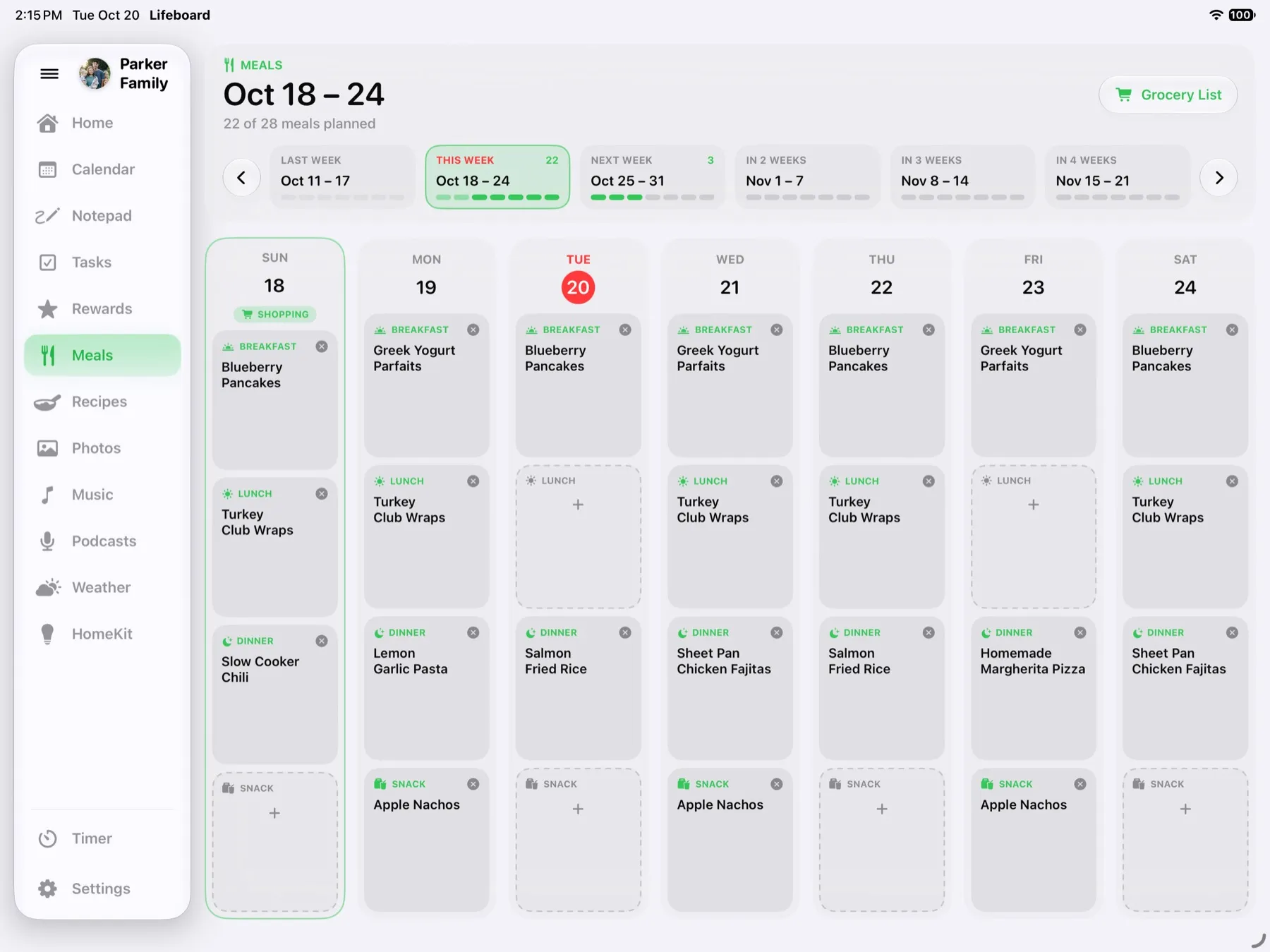
Plan the week. The grocery list writes itself.
Pick dinners for the week and Lifeboard gathers every ingredient, merges the duplicates and adds your staples. One tap sends it to a shared list in Reminders for whoever's at the store.
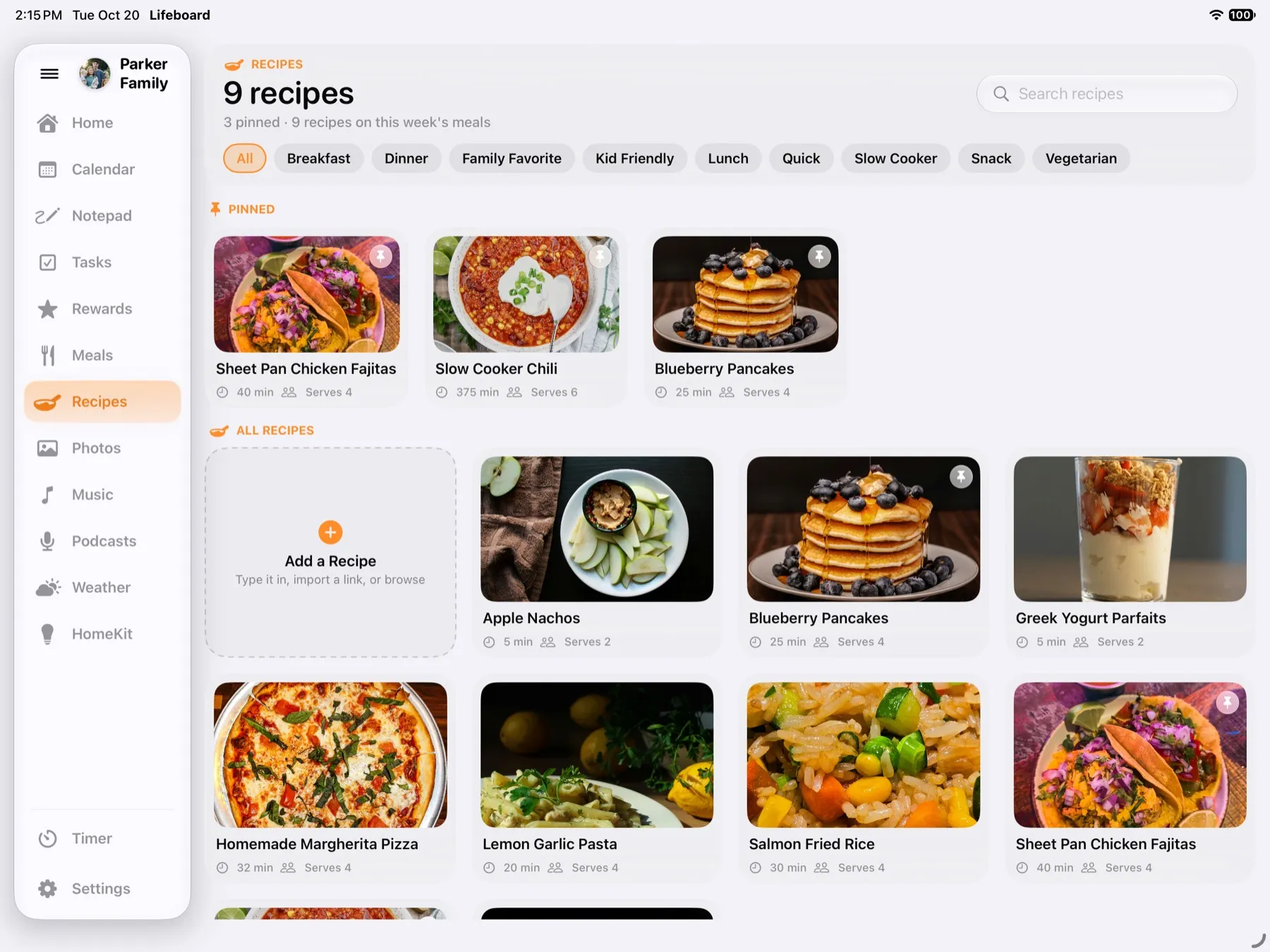
The family cookbook.
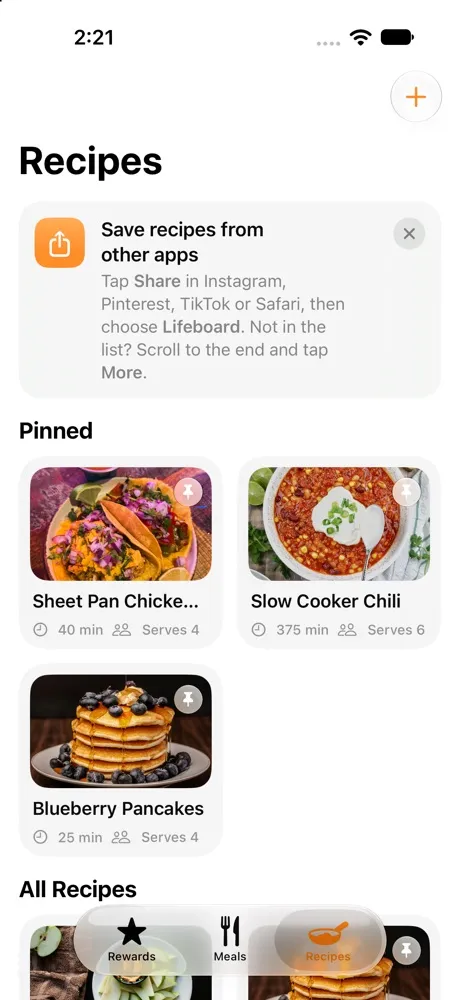
Save recipes, pin the favorites and scale any of them to the number of people at the table. From Instagram, Pinterest, TikTok or Safari, tap Share and choose Lifeboard.
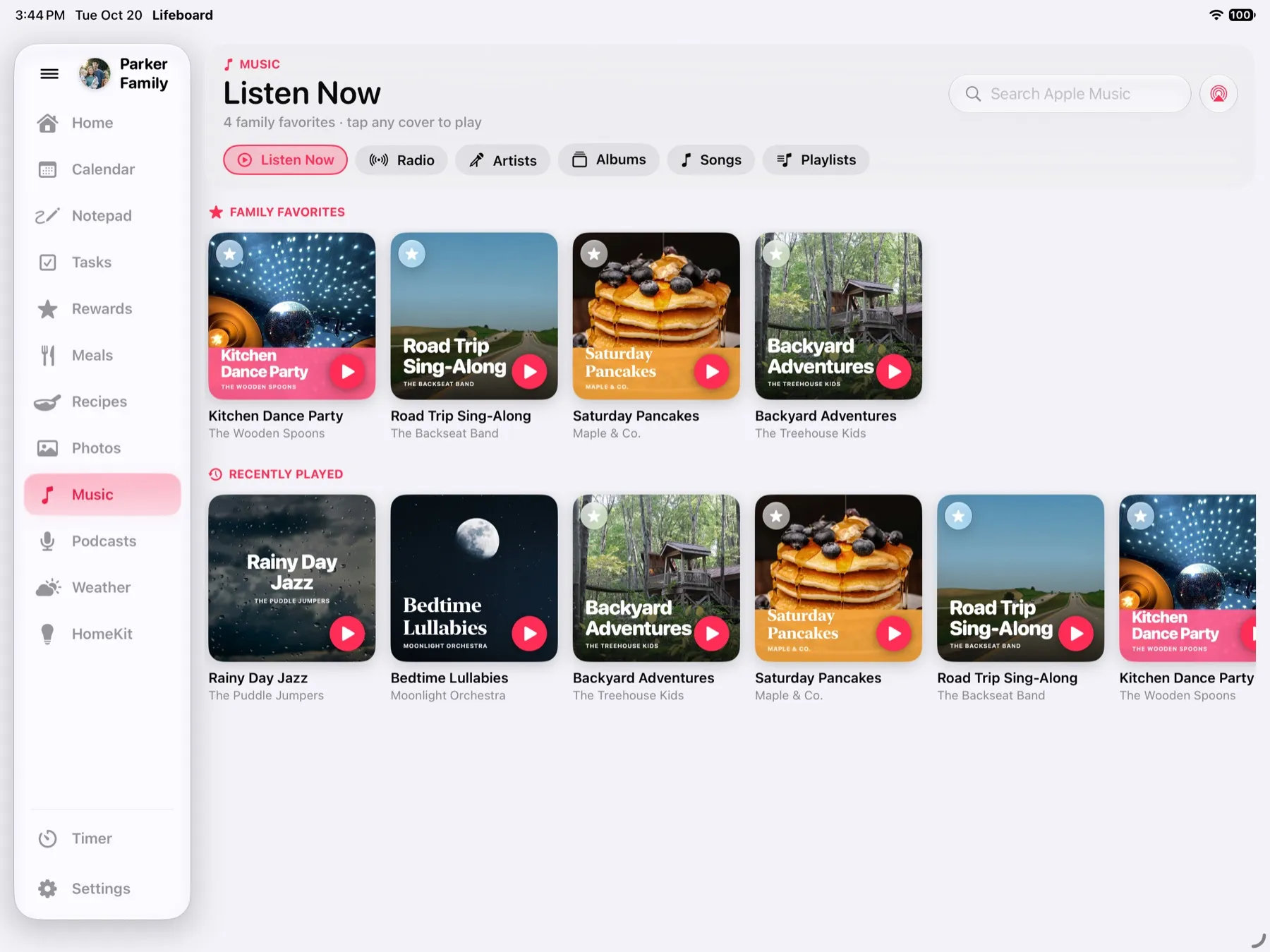
The kitchen jukebox.
Pin the family's favorite albums and playlists, then tap a cover to play. Follow kids' shows and grown-up favorites too, and AirPlay sends it all to any speaker in the house.
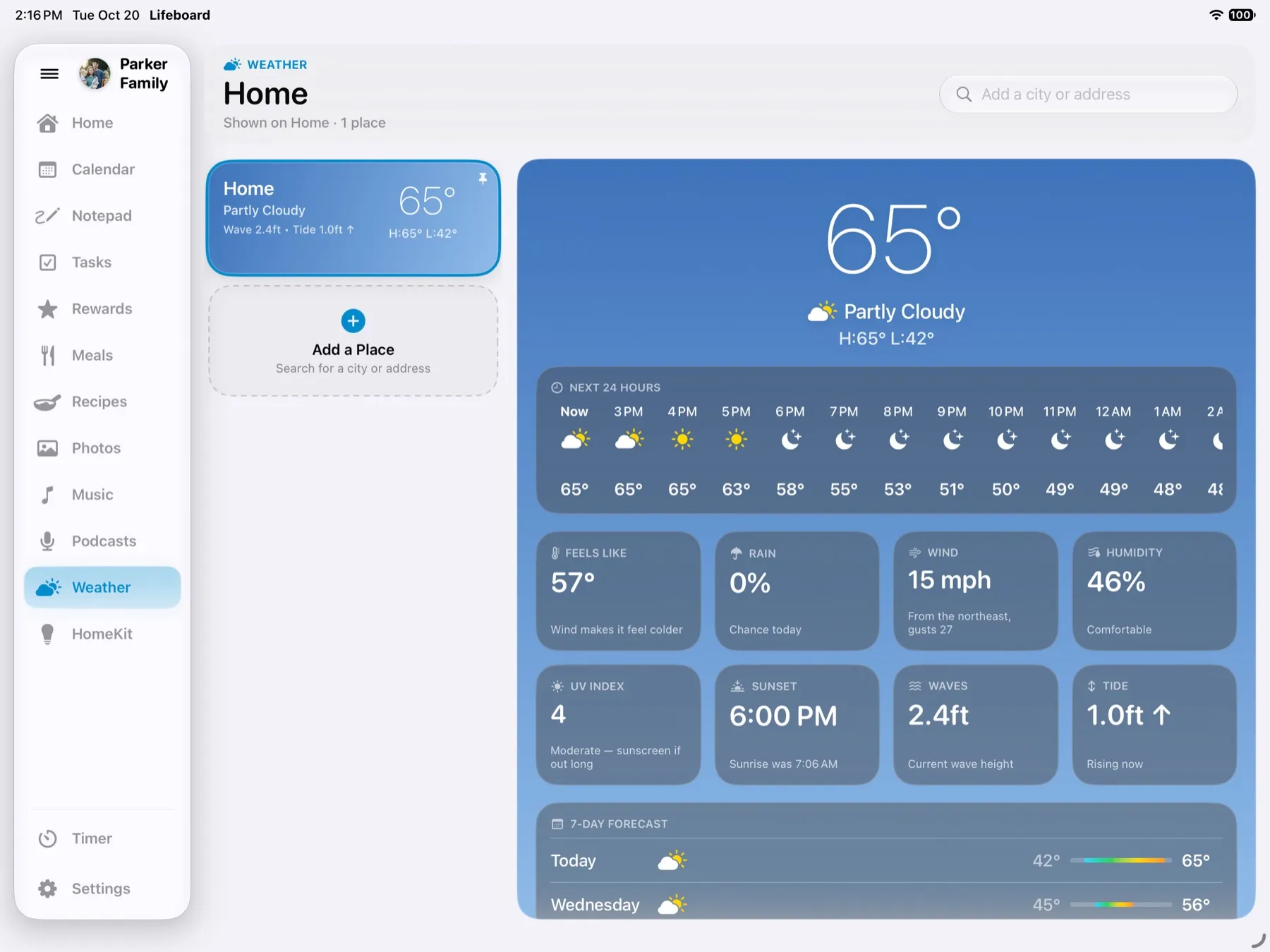
Coat or no coat?
Right now, the next 24 hours and the week ahead, plus waves and tide estimates near the coast, so everyone knows what to grab on the way out.
Lights out from the kitchen.
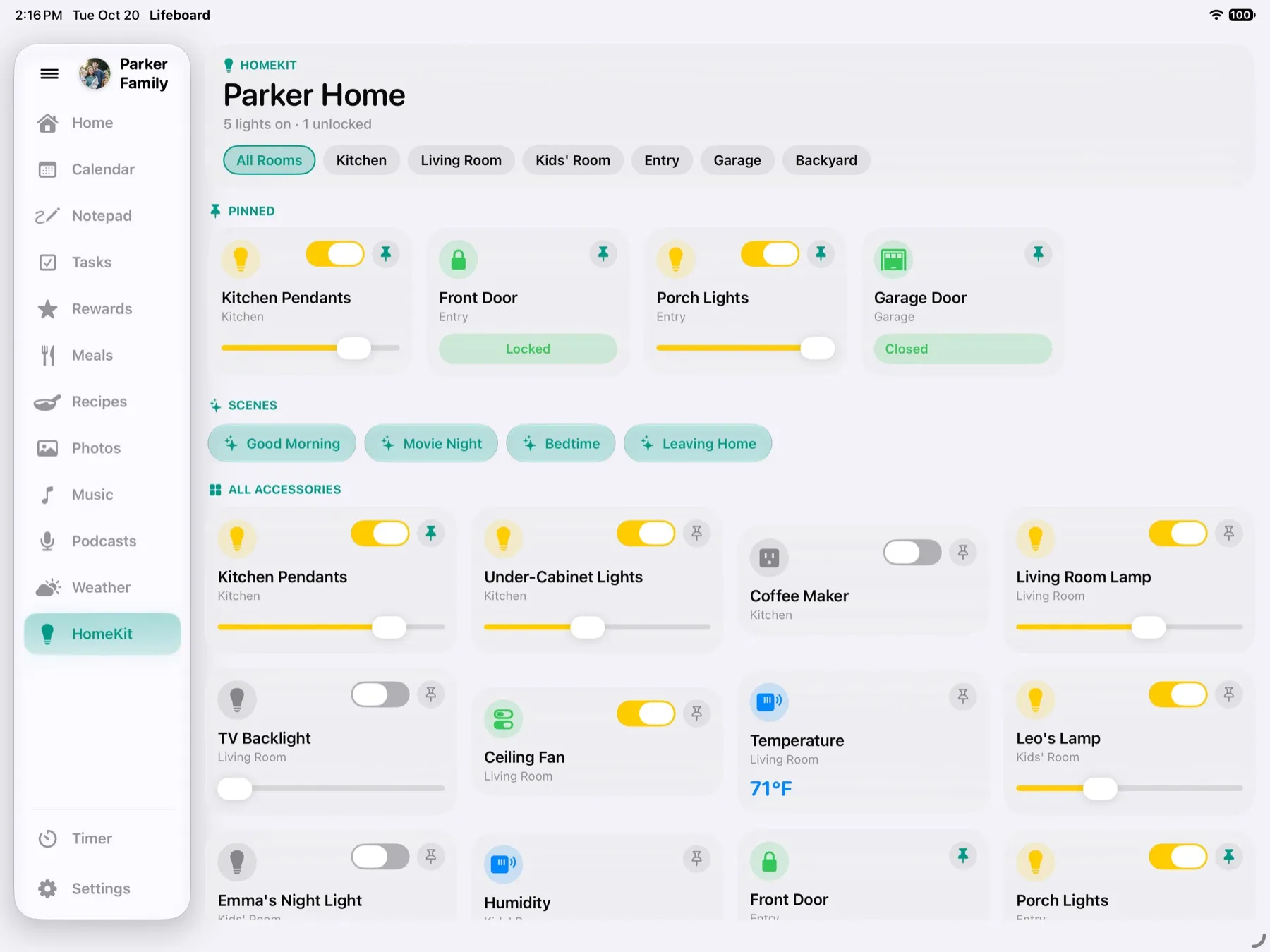
The rooms, lights, locks and scenes from the Home app, ready to tap. Pin the ones you use most, like the front door and the porch lights.
Flour on your hands? Just ask.
Say “Hey Lifeboard” and a chime lets you know it's listening. Set a pasta timer, snooze it, or stop the alarm without touching the screen. Speech is recognized on the iPad itself, so nothing you say is sent anywhere.
Connect Apple's apps. That's the setup.
Lifeboard shows what's already in your Calendar, Reminders and Photos, and the lights and locks in Home. iPadOS asks once for each, and nothing leaves your iCloud.
Add events the way you already do
Use Calendar on any iPhone, iPad or Mac. Everyone's iCloud, Google and work calendars show up on the counter, each in their own color.
Chores and groceries from any phone
Add a chore or a grocery item to a shared Reminders list, even by asking Siri. It's on the kitchen iPad moments later, and the kids check it off right there.
Share a photo, see it on the counter
Add photos to the album you pick, from anyone's iPhone, and they join the slideshow. No uploading and no separate account.
Music for the whole kitchen
Your playlists and the Apple Music catalog, played from the counter, with AirPlay to any speaker in the house. Needs an Apple Music subscription.
Lights and cameras at a tap
Lights, locks, scenes and live camera views from the Home app, ready to tap. See who's at the door without leaving the kitchen.
Timers, said your way
Understands timers however you say them, using Apple's on-device model. Nothing leaves the iPad.
Hands-free when your hands are full
Hears “Hey Lifeboard” with Apple's speech recognition running on the iPad itself.
A real family notepad
The notepad uses Apple's own drawing engine, with every pen, marker and color you know.
Give your old iPad a new job.
That iPad in the drawer already makes a better family hub than a new wall display. Most iPads from 2019 on run Lifeboard, so there's nothing new to buy, mount or pay for every month.
A color for every kitchen.
Pick one of eight soft backgrounds in Settings to match your walls, your counters or your mood. Each is tuned for light and dark mode, and Lifeboard follows your iPad's setting, so it can go dark at sunset. Night Mode goes further, dimming and warming the screen on a schedule so it's easy on the eyes late at night.
Picture it on your counter? Lifeboard launches this November.
Get notified →Take Lifeboard with you.
The iPhone app covers what happens away from the kitchen: kids' points, the week's meals, the grocery list and new recipes. It all syncs with the iPad through iCloud.
Points on the go
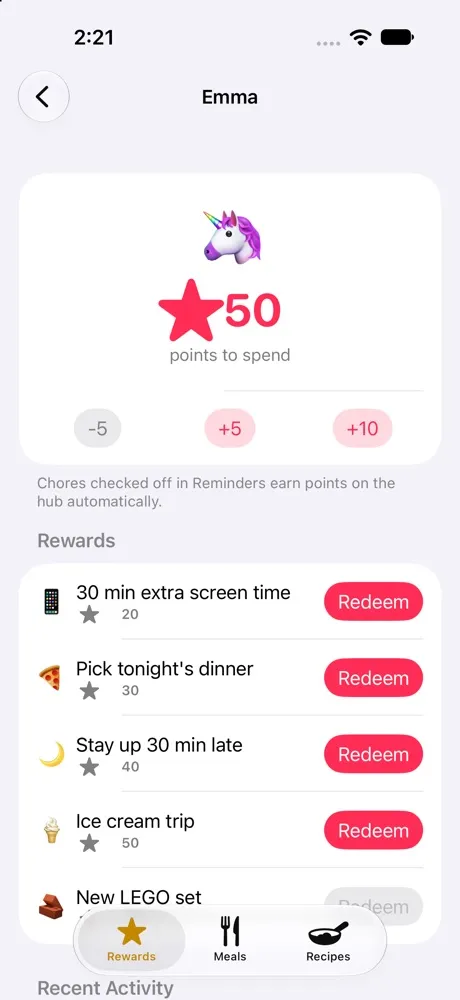
See each kid's points, add a bonus for a good deed, or redeem a reward right from your phone.
Plan it, then shop it
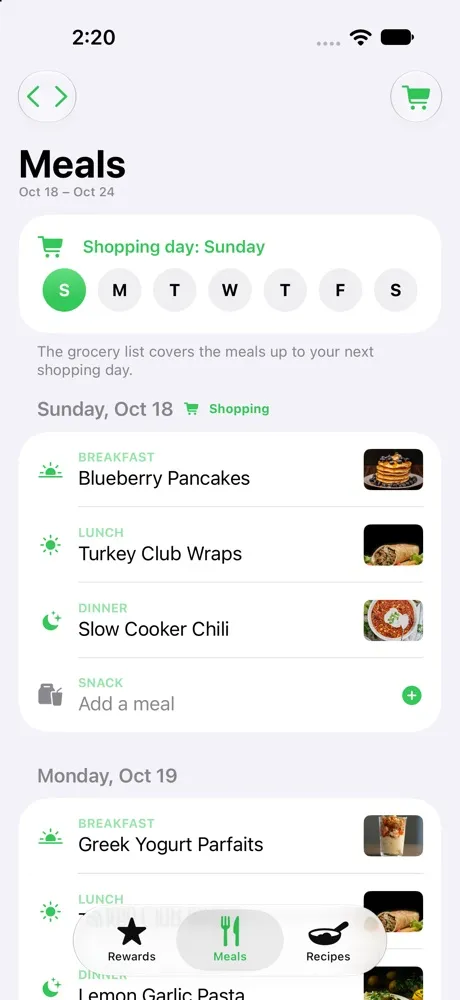
Plan the week's meals, pick your shopping day and pull up the grocery list in the aisle.
Save recipes from anywhere
In Instagram, Pinterest, TikTok or Safari, tap Share and choose Lifeboard. The photo, ingredients and steps come along, neatly organized.
Up and running in five minutes.
You'll need an iPad for the counter, and a family that keeps its plans in Apple's Calendar and Reminders. From there it's three steps.
Open Lifeboard on your iPad
Allow Calendar, Reminders and Photos. Your events, lists and photos show up right away.
Add your kids
Give each child an emoji and pick their chore list in Reminders. Every chore they check off earns points.
Put it on the counter
Turn on Guided Access and the iPad stays in Lifeboard, plugged in and ready for the whole family.

Made by a dad who needed it.
I'm a teacher by trade, a husband and a dad. If you have kids, you know the feeling: soccer on Tuesday, a dentist appointment nobody mentioned, a permission slip due tomorrow and a grocery list that only exists in one person's head.
My family tried the smart wall calendars and the organizer apps. Some were great for a month. But the hardware was expensive, the best features sat behind a subscription, and none of them worked with the calendars and lists already on our phones. So they faded, and we went back to the fridge.
Outside the classroom, I've spent years designing software and systems for fintech companies, where things have to be simple, reliable and private. Lifeboard brings that to the kitchen counter: the iPad you already have, built on Apple's own Calendar, Reminders and Photos. Add something on your phone and it's on the counter. Check it off on the counter and it's done everywhere.
It started as something for my family. I hope it helps yours too.
Good to know.
How much does Lifeboard cost?
$29.99, once, with a free 14-day trial so you can try it on your iPad first. There's no subscription and no Lifeboard account, and rewards, meal planning, recipes and the photo frame are all included.
Do I need an iPhone too?
No. Lifeboard runs on an iPad on the counter. The iPhone app is optional, for kids' points, meals and recipes on the go, and needs iOS 26 or later (iPhone 11 and later, or iPhone SE 2nd generation and later). Everyone can keep adding events and chores in Apple's Calendar and Reminders, on any iPhone, iPad, Mac or Apple Watch.
Does it work if someone in the family uses Android?
Lifeboard is made for families on iPhone and iPad, because it reads Apple's Calendar, Reminders and Photos. A Google or work calendar added to the iPad's Calendar app shows up too, but chores, rewards and the grocery list need Apple's apps.
Which iPad do I need?
Any iPad that runs iPadOS 26 or later:
- iPad Pro: every 11-inch and 13-inch model, and the 12.9-inch from the 3rd generation (2018) on
- iPad Air: 3rd generation (2019) and later
- iPad: 8th generation (2020) and later, including iPad (A16)
- iPad mini: 5th generation (2019) and later, including iPad mini (A17 Pro)
Understanding looser voice phrasing uses Apple Intelligence, on iPads with an M-series chip and the iPad mini (A17 Pro). Everything else works on all of them.
Do I need to make an account?
No. There's no Lifeboard account or sign-up. Lifeboard uses the Apple Account and iCloud your family already has.
Where is my family's information kept?
In Apple's apps and your own iCloud. Lifeboard has no servers of its own, so your calendars, chores and photos never come to us. It only goes online for your town's weather, music and podcasts you play, and recipes you choose to import.
What happens if the Wi-Fi goes out?
The essentials keep working. Your calendar, chores, lists and timers are on the iPad itself, and anything you change catches up with everyone's phones once you're back online. Weather, music, podcasts and recipe search need the internet.
Can the kids get out of it?
Not unless you want them to. Turn on Guided Access, built into every iPad, and the iPad stays in Lifeboard until a parent enters the passcode.
What should I stand it on?
Any sturdy stand that keeps it plugged in. Lifeboard works sideways or upright, so it's entirely up to you: landscape fits a counter nicely, and portrait is great on a wall or a narrow spot. Apple's own Smart Folio and the stands sold at the Apple Store work great. Some families, ours included, go one step further and mount it right on the fridge with strong neodymium magnets on a case. If you try that, use a sturdy case, keep the magnets away from the iPad's edges, and know that it's at your own risk.
Is it okay to leave my iPad on all day?
Yes. Lifeboard is made to stay on the counter, plugged in. When no one's using it, it turns into a photo frame, and Night Mode dims and warms the screen on a schedule. If your iPad has a charging limit option in Settings, under Battery, turning it on helps the battery stay healthy when it's always plugged in.
Is it always listening?
Only if you turn on Hands-Free voice control. It's off until you choose it. Speech is recognized on the iPad itself, and nothing you say is recorded or sent anywhere. Tap to Talk listens only after you tap the mic.
Does it work with my smart home?
Yes, if your lights, locks and cameras are in Apple's Home app. Lifeboard shows the same rooms and scenes. Devices that only work with Alexa or Google Home won't appear unless they're added to Apple Home, as Matter devices can be.
Can I play Spotify?
No. Music comes from Apple Music, and playing its full catalog needs an Apple Music subscription. Podcasts come from Apple's podcast directory.
What languages does it speak?
English for now. Voice control understands US English.
Give your family a home base.
Lifeboard launches this November on iPad, with a companion app for iPhone. Leave your email and we'll tell you the day it's out.
Just one email when it's out. No spam. Privacy policy